Full Code Medical Simulation
- 4.1
- Rating
- 1.00M
- Installs
- Free
- Price

 Analysis by App-foxy
Full Code Medical Simulation is the kind of medical learning app I would suggest to someone who wants to practise clinical thinking without waiting for a classroom session, a study partner, or access to a physical simulation lab. It is a virtual simulation platform from Full Code Medical Inc., aimed at medical learners who need a practical way to work through patient situations whenever they have time.
My first impression is that it is more useful as a decision-making workout than as a conventional reference book. You are not simply reading a definition and moving on. The value comes from pausing, deciding what matters, and checking whether your next step makes sense in a clinical context. That makes it particularly interesting for learners who understand concepts in theory but still feel uncertain when several pieces of information arrive together.
The app is free to install and is rated for Everyone 10+, although its subject matter is clearly directed at people studying medicine or related health disciplines. It has an average rating of 4.2 from around 6,500 ratings, with more than 500 written reviews, and it has passed the one-million-install mark. Those figures suggest that it has found a sizeable audience, but I would still judge it by how well its simulation style fits your learning habits rather than treating popularity as proof that it is right for everyone.
You May Also Like

 Blood Strike: 2.5 Anniversary
Blood Strike’s Loadouts Turn Every Drop Into a Tactical Gamble
A close look at Blood Strike’s custom loadouts: how fast access to signature weapons reshapes its battle royale rhythm, rewards preparation, and narrows the gap between fights.

 Pandora - Music & Podcasts
Pandora’s Music Is Easy to Start, but Harder to Recover
Pandora’s strength is its low-effort path from a seed to a station. Its weak spot is how much confidence it asks you to place in connection, setup, and quiet recovery.

 8 Ball Pool
 Is Built on Rivalries, Rematches, and Routine
A close look at the rivalries, rematches, shared routines, and unanswered safety questions that turn a quick pool match into a persistent mobile community.

 Samsung Music
’s Quiet Strength Is Playing What You Already Own
Its reach comes less from spectacle than from dependable access to a personal library. That simplicity is both the app’s strongest retention engine and its ceiling.

 AccuWeather: Weather Radar
AccuWeather Review: A Quick, Clear Forecast for Everyday Decisions
For everyday plans, the best forecast is the one you can understand quickly. AccuWeather makes rain timing, radar, and local conditions easy to act on, with a few trade-offs.

 Hill Climb Racing
Why Hill Climb Racing Still Turns Crashes Into One More Run
A tiny car, a bumpy hill and one more upgrade: Hill Climb Racing keeps resurfacing because its simple chaos makes every near-miss feel personal.
More From Our News Desk



What to expect when you open the simulation
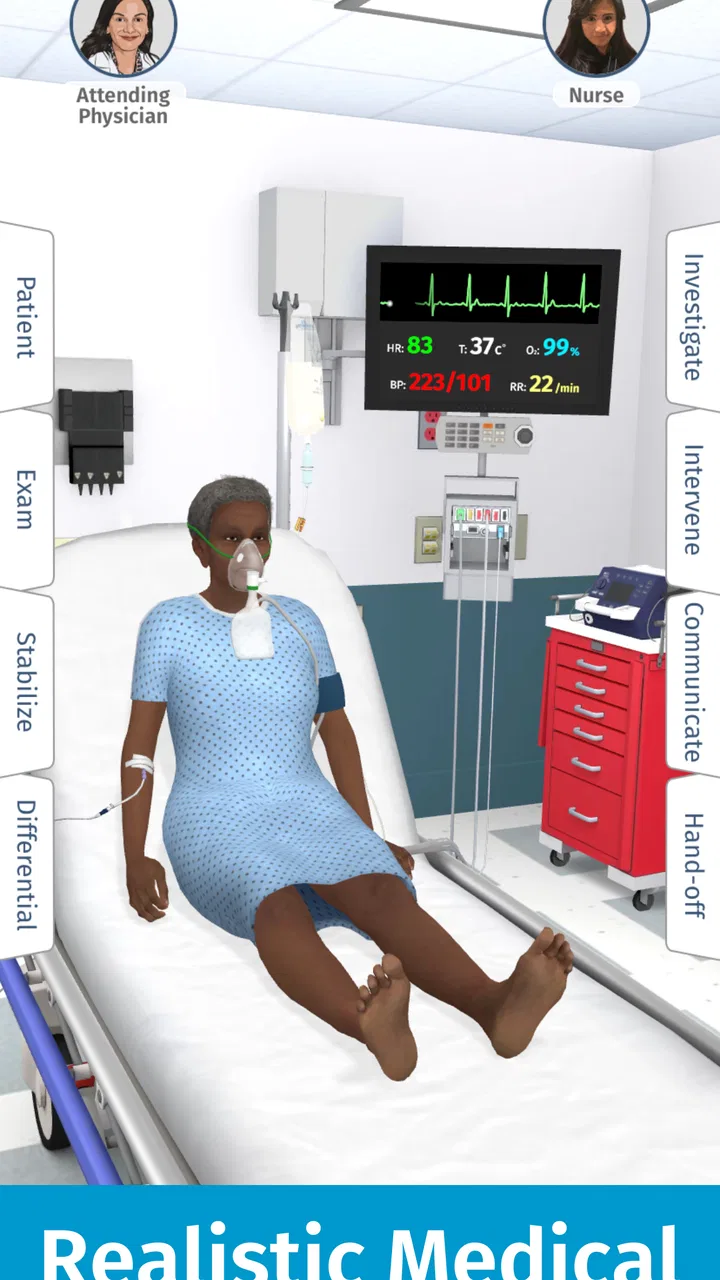
The most important adjustment is to stop expecting a normal flashcard app. Full Code Medical Simulation is built around virtual patient practice, so the useful question is not only “What do I know?” but also “What should I do next?” That difference changes how I use it. I try to approach a case as a short clinical exercise, rather than tapping through it casually while half-focused on something else.
For a first-time user, the experience can feel more demanding than a simple quiz because clinical decisions are rarely isolated facts. You may need to think about what information is relevant, what deserves attention first, and whether an action is appropriate at that moment. Even when I already know the underlying medical topic, the simulation format makes me consider sequence and priorities instead of merely recognizing an answer.
That is where the app’s strongest educational value lies. It gives learners a place to rehearse the mental process between noticing a problem and choosing a response. A textbook can explain why a condition matters, and a video can demonstrate a procedure, but neither necessarily forces me to commit to a next step. A virtual case does.
I would not use it as a replacement for supervised clinical education, official course material, or professional guidance. It is a practice environment, not a license to make real-world medical decisions independently. The safest way to use it is to connect each session to your existing studies and treat the result as a prompt for review, discussion, and further learning.
Who will get the most from it
This app makes the most sense for medical students, trainees, and other learners who want to turn passive knowledge into active reasoning. It can also suit someone preparing for an assessment who keeps making mistakes not because the facts are unfamiliar, but because choosing between several plausible actions feels difficult.
I think it is especially helpful for learners who study in short blocks. A spare period between classes or a quiet evening can become a focused case session instead of another round of disconnected memorization. The app is available on Android devices running at least version 8.0, so it can fit into a fairly ordinary mobile study routine rather than requiring a specialized setup.
On the other hand, I would skip it if you want a quick medical dictionary, a medication reference, or a straightforward collection of definitions. Those tools are better when the goal is to look up one fact quickly. Full Code Medical Simulation asks for more attention because its purpose is to practise applying knowledge, not simply retrieve it.
Starting without making the first session harder
After installing the app, I recommend setting aside a genuinely quiet first session instead of opening it while commuting or multitasking. The first useful success is not completing a large number of cases. It is understanding how the simulation expects you to think and finishing one scenario with a clear sense of what you noticed, what you chose, and what you would investigate next time.
Before tapping through a case, I would keep a small note nearby, either on paper or in a separate notes app. Write down three things: the main concern you see, the information you most need, and the action you are considering. This simple habit prevents the session from becoming random tapping. It also gives you something concrete to compare with the outcome and makes errors easier to learn from.
Another useful approach is to begin with a time limit that feels manageable. I prefer a short, concentrated session over trying to work through too much material in one sitting. Clinical reasoning becomes less useful when fatigue turns every decision into guesswork. If you notice that you are selecting options just to move forward, stop and review the last decision instead of pushing ahead.
The app is free, but it includes in-app purchases ranging from $3.99 to $99.99 per item. I would explore the free experience first and decide whether the workflow genuinely helps before spending anything. That is particularly important for students, because the presence of paid items means the full learning path may not feel identical to the initial free trial. Check what is available to you in the app before planning a long-term study schedule around it.
Your first meaningful success: think before you tap
My recommended first exercise is deliberately simple. Open one simulation, read the initial presentation carefully, and pause before interacting with every available option. Ask yourself what the immediate problem appears to be, which details could change your priorities, and what information would reduce uncertainty. Only then begin selecting actions.
This method turns the first case into a baseline assessment of your reasoning. If you make a poor choice, that is not a failed installation or a wasted session. It shows you where the gap is: recognizing a serious sign, ordering your assessment, distinguishing useful information from noise, or committing to an action at the right time.
When I review a difficult case, I avoid writing down only the correct response. The more useful note is the reason my original choice was weak. For example, I might have focused too quickly on a memorable diagnosis, overlooked a priority, or chosen an investigation without explaining what decision it would change. That kind of reflection transfers better to future cases than memorizing a single outcome.
A realistic everyday scenario would be a student returning from a lecture on acute presentations. Instead of rereading the same slides, the student opens Full Code Medical Simulation and uses one case to test whether the lecture knowledge works under pressure. The student makes an initial plan, notices where the case becomes confusing, and then returns to the lecture notes with a specific question. In my experience, that loop is much more productive than reading everything again from the beginning.
Another good workflow is to use the app before a study-group meeting. Complete the same scenario individually, record the point where your reasoning changed, and then compare approaches with classmates. The discussion becomes more useful because you are debating decisions and priorities rather than vaguely asking whether everyone understood the topic.
Where first-time users can become confused
The biggest source of confusion is treating the simulation like a multiple-choice test with one isolated answer. Clinical situations are connected, so an action can be reasonable in one context and poorly timed in another. If you focus only on whether an option sounds medically familiar, you may miss the larger question of why it belongs at that point in the case.
I also think new users can mistake difficulty for a lack of ability. A simulation may expose uncertainty that a reading session hides. That is useful, but only if you respond by slowing down and identifying the exact uncertainty. Was the problem the medical concept, the order of actions, or the interpretation of the information presented? Separate those issues before deciding that the entire topic needs to be relearned.
Another practical mistake is rushing through a case after an early error. Once I know I have made a poor choice, it is tempting to tap faster and see how the scenario ends. That produces completion, but not much learning. I get more value by treating the mistake as a checkpoint, writing down what I expected to happen, and then examining how the next information changes the picture.
The mobile format can create its own friction. A phone is convenient, but it is also easy to interrupt a session, lose concentration, or use the app in a setting where careful reasoning is unrealistic. For serious study, I prefer a stable connection to my notes, headphones only if they help me focus, and enough time to finish a thought before responding. The platform is available anytime and anywhere, but that does not mean every location is equally good for learning.
How it compares with familiar study alternatives
Compared with flashcards, this app is stronger when you need to practise prioritization and action. Flashcards are excellent for repeated recall of terminology, mechanisms, and concise facts. They are faster and easier to measure, but they rarely reproduce the uncertainty of a developing patient situation. I would use flashcards to build the foundation and simulations to test whether I can use that foundation.
Compared with textbooks, Full Code Medical Simulation is more interactive and less suitable for broad, systematic coverage. A textbook gives you a structured explanation that you can revisit slowly, while a case makes you choose. If I am unfamiliar with a subject, I would learn the basic framework first from course resources and then use a simulation to discover which parts fail when I have to apply them.
Compared with videos, the app gives me more responsibility for the decision. A video can be reassuring because an expert demonstrates the process from start to finish. That is useful for orientation, but it can create the illusion that I would know what to do in the same situation. A simulation removes that comfort and shows whether I can make the choice myself.
Compared with a physical simulation lab, the app is obviously more convenient and easier to repeat privately. It cannot offer the same hands-on practice, team communication, or physical realism. I see it as preparation and reinforcement rather than a substitute. It can help me arrive at supervised practice with better questions, but it cannot reproduce everything that happens when real people, equipment, and time pressure are involved.
Three ways to make the practice more useful
First, separate recognition from reasoning. On the first pass, identify what you think is happening without immediately searching for confirmation. On the second pass, explain why your chosen action should come before the alternatives. This prevents a familiar diagnosis from doing all the thinking for you.
Second, keep a mistake log organized by decision type rather than by disease name. I find categories such as “missed priority,” “insufficient information,” and “acted too early” more useful than a long list of case titles. If the same decision pattern appears repeatedly, the problem is probably a reasoning habit that needs attention, not one isolated topic.
Third, revisit difficult cases after a gap instead of repeating them immediately until the correct path feels obvious. Immediate repetition can reward memory of the sequence rather than understanding. Returning later forces you to rebuild the reasoning and gives a more honest picture of what stayed with you.
A fourth tip is to explain your choice aloud, even when studying alone. If you cannot state what you are trying to learn from an action or what result would change your plan, you may be tapping from habit. Speaking the reasoning takes only a moment and exposes uncertainty that silent clicking can hide.
What the paid model means for your routine
The free price makes it easy to try the platform without committing at the start, which I appreciate. At the same time, the in-app purchase range is broad enough that I would not assume every useful section is included without checking the options presented in the app. A sensible plan is to use the available material for several focused sessions, decide whether the simulation style improves your study, and only then consider an upgrade.
I would also avoid buying access simply because a case feels difficult. Difficulty is not evidence that you need more content; sometimes the better next step is reviewing a foundational concept or discussing the decision with an instructor. Paid material is worthwhile when it supports a clear learning plan, not when it becomes a substitute for understanding why you are struggling.
Performance, audience, and practical fit
The current version is 3.6.1, and the app supports Android 8.0 and later. That makes the compatibility question fairly straightforward for many Android users, but I would still check the device before planning to rely on it during a course. A medical simulation is most useful when it opens reliably and remains comfortable to use, especially if you are trying to establish a regular study habit.
The Everyone 10+ content rating should not be confused with a general-audience learning level. The rating describes the app’s store classification, while the actual material is aimed at medical learners. A younger user might be able to install it, but without appropriate background the cases may feel confusing rather than educational. I would recommend it based on study goals and preparation, not age alone.
Full Code Medical Inc. has positioned the product around accessible virtual practice, and that focus is apparent in the way I use it: open it when I need to rehearse decisions, not when I need a complete medical library. The one-million-plus install figure and solid 4.2 average show that many people find the concept useful, but the app still rewards a disciplined approach more than casual browsing.
My recommendation for the next step
If you are installing it for the first time, begin with one case and a written prediction. Do not measure success by how quickly you finish. Measure it by whether you can describe the problem, justify your next action, and identify one specific point to review afterward. That is the first meaningful result the app can give you.
After that, build a modest routine around your existing studies. Use a simulation after learning a topic, record the decision that felt least secure, and take that question back to your notes, instructor, or study group. This makes the app part of a learning cycle instead of an isolated source of answers.
I recommend Full Code Medical Simulation to learners who want more active practice than flashcards or reading can provide and who are comfortable reflecting on mistakes. I would choose a textbook, reference app, or supervised lab first if your immediate need is detailed explanation, quick lookup, or hands-on training. The app is at its best when you use it to practise clinical reasoning, not when you expect it to replace clinical education.
Overall, I find it a worthwhile free starting point for medical simulation practice. It has enough structure to make study more active, enough challenge to reveal weak habits, and enough flexibility to fit short sessions. The main limitation is not that it tries to do too much, but that its value depends on how thoughtfully you respond to each case. If you slow down, record your reasoning, and connect the outcome to further study, the platform can turn a spare part of the day into focused preparation.
FAQs for Full Code Medical Simulation
01What is Full Code Medical Simulation, and who is it for?
Full Code Medical Simulation is an interactive app designed for medical professionals and students to practice clinical decision-making through realistic case scenarios. It's an educational tool that helps users enhance their diagnostic and treatment skills in a risk-free environment. Ideal for medical students, nurses, and emergency responders, it provides a hands-on learning experience.
02How realistic are the medical scenarios in Full Code?
The scenarios in Full Code Medical Simulation are crafted by experienced medical professionals and are designed to mimic real-life clinical situations closely. The app offers a variety of cases with different levels of complexity, ensuring users encounter a wide range of medical conditions and challenges, enhancing their problem-solving and critical-thinking skills.
03Is internet access required to use Full Code Medical Simulation?
While an internet connection is required to download the app and access updates or new content, many of the scenarios can be accessed offline once downloaded. This makes it convenient for users to practice anytime, anywhere, without relying on continuous internet access, which is especially useful in educational settings or during travel.
04Are there any in-app purchases or subscriptions in Full Code?
Full Code Medical Simulation offers a variety of free cases to get users started. However, to access the full library of advanced cases and additional features, users may need to purchase individual cases or subscribe for premium content. The app provides clear information about costs before any transactions occur.
05How does Full Code Medical Simulation support learning and progress tracking?
The app provides detailed feedback on performance after each scenario, highlighting correct actions and areas for improvement. Users can track their progress over time, helping them identify strengths and areas needing more focus. This feature is particularly beneficial for those using the app as part of a structured learning program or curriculum.
Pros
- Realistic medical scenarios enhance learning.
- Interactive interface engages users effectively.
- Diverse case studies improve problem-solving skills.
- Regular updates with new simulations included.
- Offline mode available for convenient access.
Cons
- Requires high storage space on the device.
- Steep learning curve for beginners.
- Limited language options available.
- Some features locked behind paywall.
- Occasional bugs disrupt simulation flow.

Full Code Medical Simulation
Gallery